
The short answer ROAS means how many rupees of sales came back for each rupee you spent on ads. The number in Meta is Meta’s own estimate, not money in your bank. To check it, compare it with your real orders for the same dates. Then use the calculator below to see whether that return actually makes you a profit.
Think of it like thisImagine paying a salesperson who also writes their own report. They take credit for every customer who walked past their poster, including people who were coming in anyway. The report isn’t a lie, but you’d still check the till.
What the number means
It’s simple division: sales Meta credits to your ads, divided by what you spent. Here’s a real example from an e-commerce account we manage.
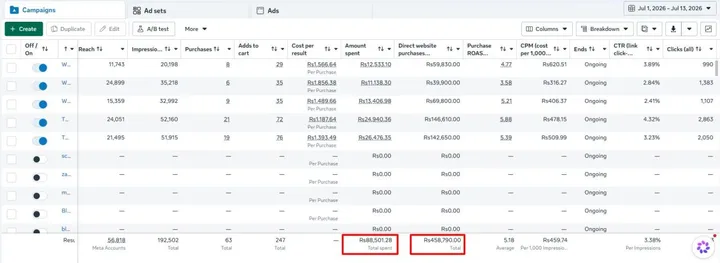
These numbers haven’t been checked against the client’s orders, and our case study says so. A number like this is where your questions should start.
Why Meta’s number won’t match your orders
Meta takes credit for a while afterwards
If someone clicks your ad and buys within days, Meta counts it, even if they came back through Google. A common setting is 7 days after a click, or 1 day after just seeing the ad. Your account shows which setting it uses.
Some orders don’t stay sold
Meta counts the order when it’s placed. It doesn’t automatically learn about a later cancellation, refund or return, or a cash-on-delivery parcel refused at the door. If you sell on COD, check this first.
Some people were buying anyway
Your regular customers see your ads too. If one sees an ad and buys as planned, Meta can still count it. The report looks good, but the ad didn’t add much.
Tracking isn’t perfect
A sale can be counted twice if the tracking is set up badly, or missed if a browser blocks it. Dates can differ too, so a sale can land in a different week in each report.
How to check it in 30 minutes
- Pick a month that’s finished, so most returns and cancellations have come through.
- Download from Ads Manager: spend, purchases and purchase value.
- Download from your store: orders and sales for the same dates. Remove anything cancelled, refunded or undelivered.
- Compare the order counts. If Meta claims 60 purchases and you only had 70 orders from all sources, ask how likely that really is.
- Work out your real return: total real sales ÷ total ad spend. No one’s estimate is involved. Marketers call this blended ROAS.
A simple testWhen you raise your ad budget, do your real sales go up too? If you double spend and sales barely move, the good ROAS wasn’t real growth.
Does your return actually make a profit?
A 3× return can be great for one business and a loss for another. It depends on what you keep from each sale after product, packing, shipping and payment fees. That’s your margin. Move the sliders to see yours.
Try it
Break-even calculator
The rule behind it: break-even return = 1 ÷ your margin. Keep 40% of each sale, and you need 2.5×. Keep 25%, and you need 4×.
| You keep | You need at least |
|---|---|
| 25% | 4× |
| 40% | 2.5× |
| 50% | 2× |
| 70% | 1.43× |
What to do if the gap is big
- Check for double counting. Meta’s Events Manager shows whether each purchase is being sent twice.
- Split new customers from regulars in your store data. Ads that only reach regulars are worth less than they look.
- Cut COD losses, for example by confirming orders before you dispatch them.
- Keep using Meta’s numbers to compare ads with each other. Use your own numbers to set your total budget.
Where a dashboard helps
Doing this once is easy. Doing it every week is where it gets dropped. We bring ad spend and sales into one place, so your real return sits next to Meta’s number automatically. See the 12 numbers owners check and Your Business Dashboard in 10 Days.
Questions owners ask
Why does Meta show more sales than my store?
Usually a sale counted twice, an order later cancelled, or a sale dated differently in each report. Check for double counting first.
What’s a good ROAS?
There’s no single number. A good one sits comfortably above your own break-even, month after month. Use the calculator above to find yours.
Should I stop trusting Ads Manager?
No. It’s good for comparing one ad with another. Just don’t treat its sales figure as your income. Your store and bank are the truth for that.
Want a second pair of eyes? Send us a month of Ads Manager and store exports, and we’ll walk through them on a free call.